The pricing panel
Turn your view into fair odds
The handicapper panel gives you an order. The pricing panel turns it into odds.
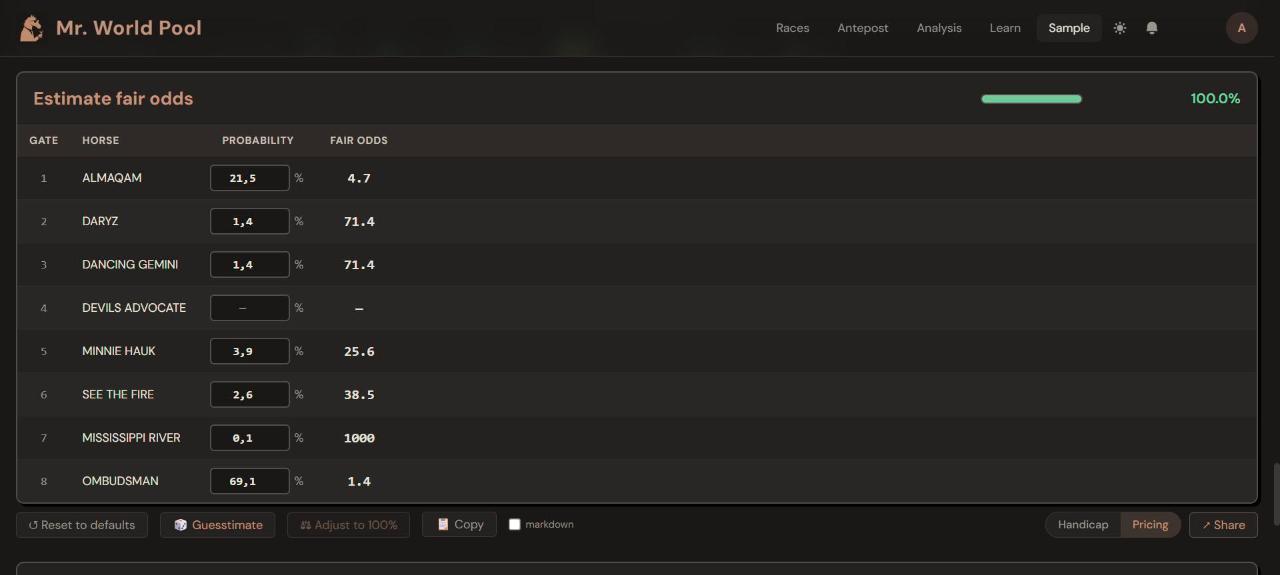
How do I open it?
Under the handicapper panel, switch from Handicap to Pricing.
How does it work?
- Give each horse a chance of winning in per cent. The fair odds appear next to it.
- The bar at the top shows how far you are from 100 %. A race has exactly one winner, so your chances should add up to 100.
- Guesstimate fills in a rough starting point from your expected ratings.
- Adjust to 100 % changes your numbers a little so they add up.
- Copy and Share let you send your prices to a friend before the race.
What is it for?
Comparing your own price with the market. If you make a horse a 4.0 chance and it is on offer at 6.0, that is the kind of horse worth a closer look. If it is 2.5, the market likes it more than you do.
What it is not
It is your own estimate, not a tip from us. The panel does the sums. The opinion is yours.
See it on the card: open any racecard and press 📖 Tour at the top right. The tour points at each of these things in turn. Start the tour on the free sample card.
Want the thinking behind it? That is what the course is for. The Intro track is free; the full course is coming soon.